SciFigureAI logoSciFigureAI
  • Pricing
  • Get Started
SciFigureAI logoSciFigureAI

Create scientific figure drafts from text, then iterate with credits that fit your research workflow.

Product
  • Text to Figure
  • Sketch to Figure
  • Edit Image
  • PPTX / SVG Export
  • Pricing
Resources
  • Inspiration
  • Tutorials
  • Pricing
  • Start Creating
Company
  • Contact
Legal
  • Cookie Policy
  • Privacy Policy
  • Terms of Service
© 2026 SciFigureAI. All Rights Reserved.
SciFigureAI tutorials

Learn the four workflows behind a complete scientific figure draft

Use these quick tutorials to move from a research idea or rough visual to a generated draft, then revise and export it for review.

Start Creating a FigureBrowse Inspiration
Text workflow

Create a figure from a research description

Use Text when you already know the scientific story but do not have a visual layout yet.

Sketch workflow

Turn a rough sketch into a cleaner visual draft

Use Sketch when you already have a layout idea and want the generated result to follow that structure.

Edit workflow

Revise a generated or uploaded image

Use Edit when the image is close, but the composition, labels, or focus still need adjustment.

Export workflow

Download previews or export PPTX / SVG files

Use Export after a generated image is ready enough for slides, review, or downstream editing.

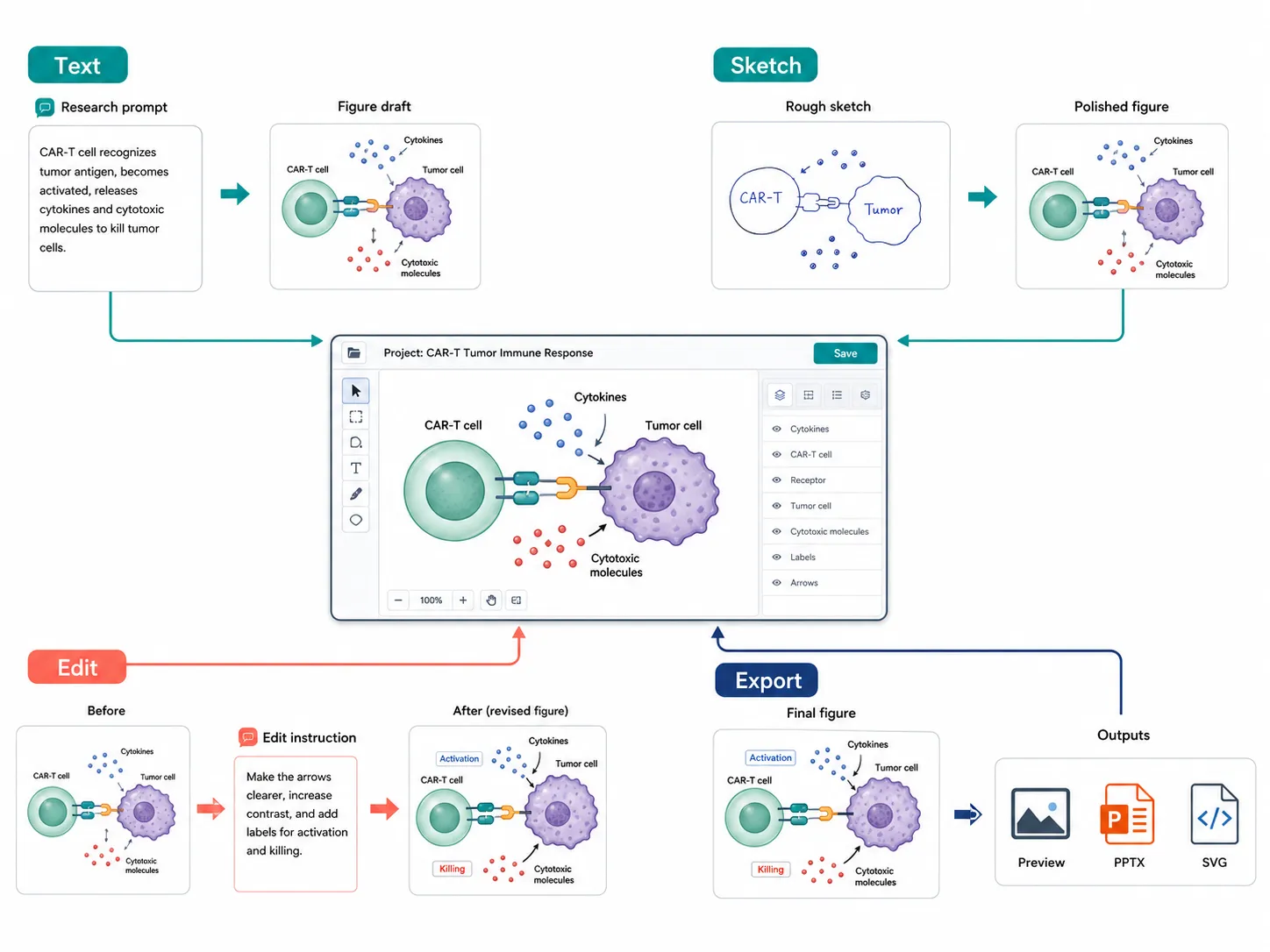
Four workflows, one project space

Each workflow maps to a real tool inside the SciFigureAI workspace. Start with the mode that matches what you already have.

Text workflow

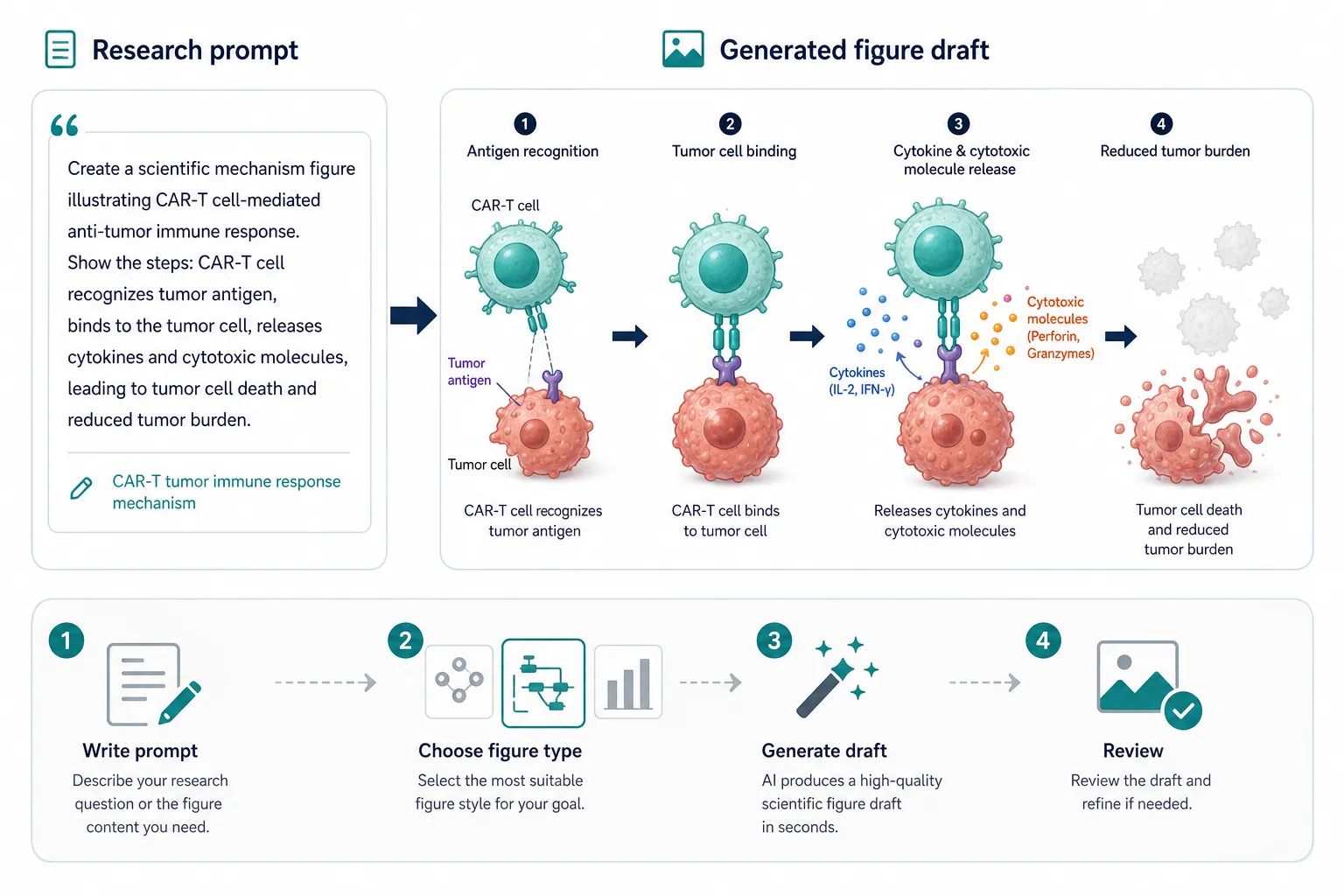
Create a figure from a research description

Use Text when you already know the scientific story but do not have a visual layout yet.

Text to scientific figure workflow example

Text input to generated draft

Text workflow

Prepare this input
  • A short abstract, mechanism summary, or research brief
  • The intended figure type, such as graphical abstract or mechanism diagram
  • Key entities, process order, and label density
Steps
  1. Open the workspace and choose Text mode.
  2. Paste the research description into the prompt field.
  3. Choose figure type, research field, aspect ratio, and resolution.
  4. Generate the draft, then review scientific details before using it.
Output

A new generated image saved to the project conversation, ready for review, editing, download, or export.

Notes
  • Short visual briefs usually work better than long unfocused abstracts.
  • Generated figures are drafts and should be reviewed by the researcher.
Start with Text
Sketch workflow

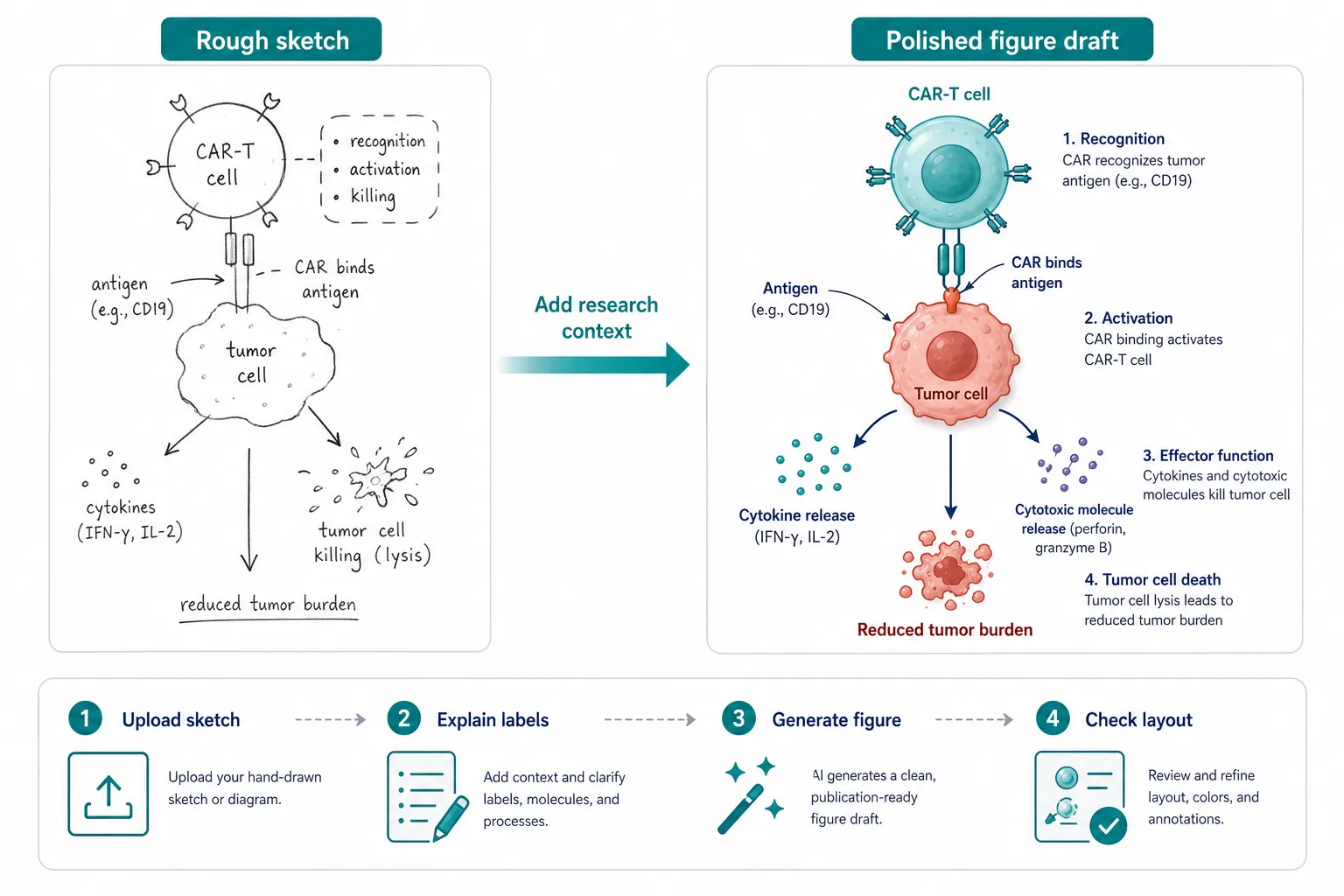
Turn a rough sketch into a cleaner visual draft

Use Sketch when you already have a layout idea and want the generated result to follow that structure.

Sketch to scientific workflow example

Sketch-guided generation

Sketch workflow

Prepare this input
  • A simple sketch, whiteboard photo, or low-fidelity layout
  • Research context that explains what each region should represent
  • A target figure type and expected level of detail
Steps
  1. Choose Sketch mode and upload the source image.
  2. Describe the scientific content and the intended visual style.
  3. Generate a new draft guided by the sketch and text.
  4. Inspect whether the layout, labels, and visual emphasis match your intent.
Output

A generated image based on the uploaded source and your research context. The source image remains guidance, not the final result.

Notes
  • Clear sketches with fewer tiny labels are easier to transform.
  • Use Edit after Sketch if the structure is close but needs refinement.
Start with a Sketch
Edit workflow

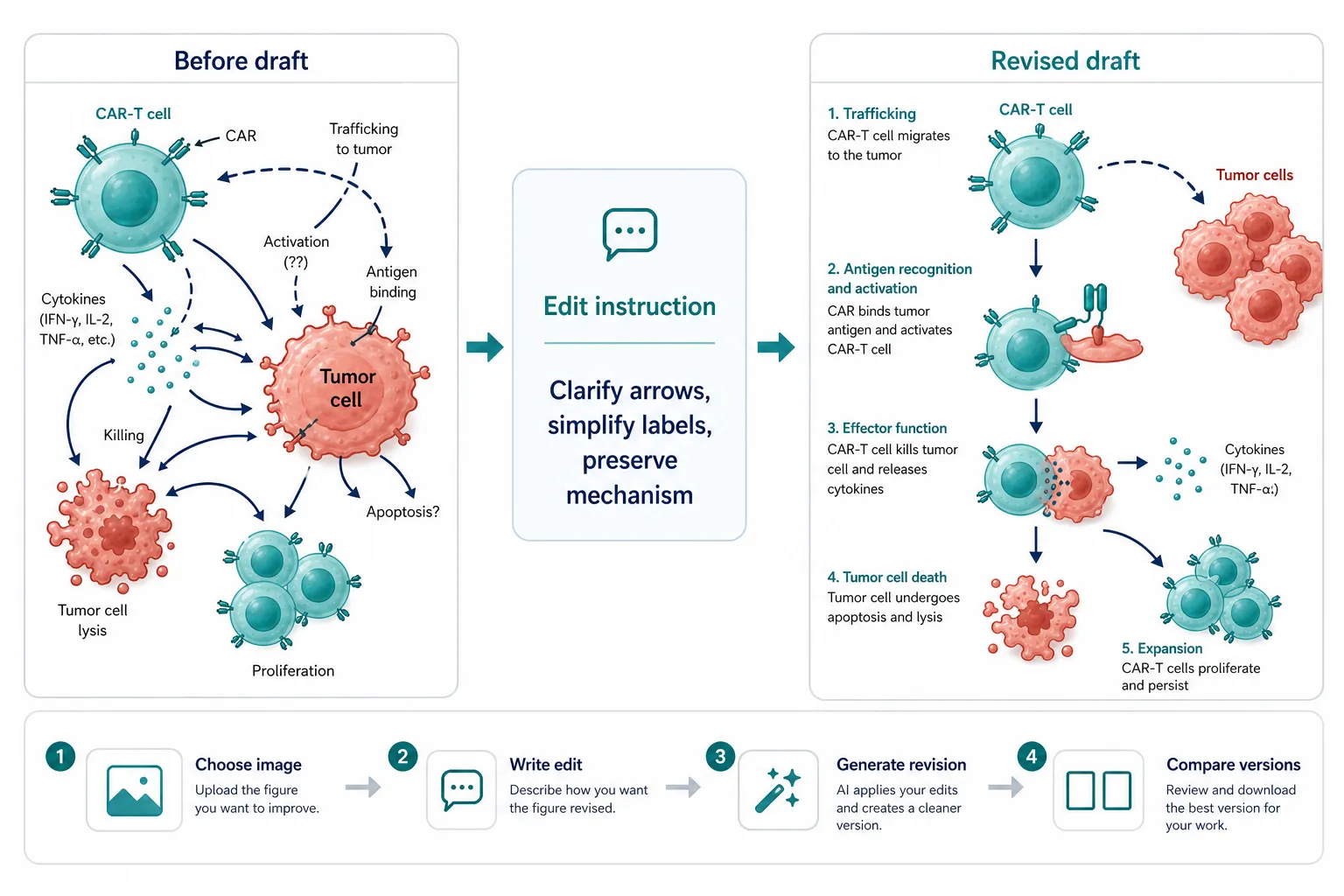
Revise a generated or uploaded image

Use Edit when the image is close, but the composition, labels, or focus still need adjustment.

Scientific image edit workflow example

Image revision workflow

Edit workflow

Prepare this input
  • A selected generated image or an uploaded external image
  • A short edit instruction that says what should change
  • Any details that should stay stable in the next version
Steps
  1. Select an image from the conversation or choose Edit mode for an uploaded image.
  2. Write a concise edit request in the composer.
  3. Generate the revised version.
  4. Compare versions and continue iterating if needed.
Output

A new image version saved in the same project, while earlier versions remain available.

Notes
  • Edit requests work best when they are specific and limited.
  • Each successful revision creates a new saved result rather than replacing the original.
Start Editing
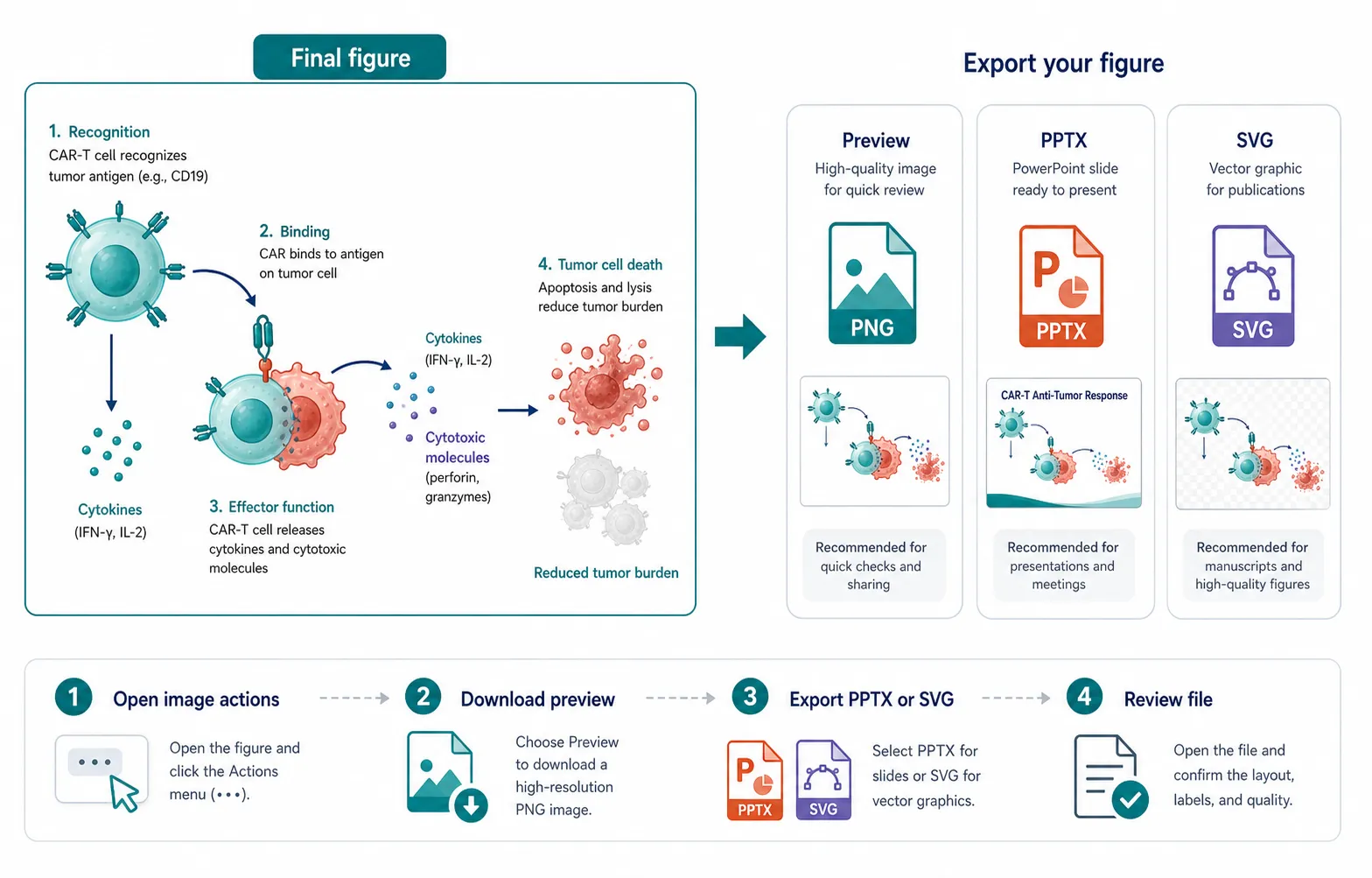
Export workflow

Download previews or export PPTX / SVG files

Use Export after a generated image is ready enough for slides, review, or downstream editing.

Scientific figure export workflow example

Preview, PPTX, and SVG export

Export workflow

Prepare this input
  • A saved generated image inside a project
  • A decision between quick preview download and export file creation
  • A final review of scientific details and embedded labels
Steps
  1. Open the generated image actions.
  2. Download the preview for quick review if that is enough.
  3. Choose PPTX or SVG when you need a presentation or editing file.
  4. Review the exported file before placing it into formal materials.
Output

A free preview download, or a created PPTX / SVG export file when you need a slide or editing handoff.

Notes
  • Download preview is free.
  • PPTX and SVG exports consume credits after the export is created successfully.
Create an Exportable Figure

Try the workflow with your own research topic

Start from text, upload a sketch, revise an image, or export the result once the draft is ready for review.

Open the Workspace